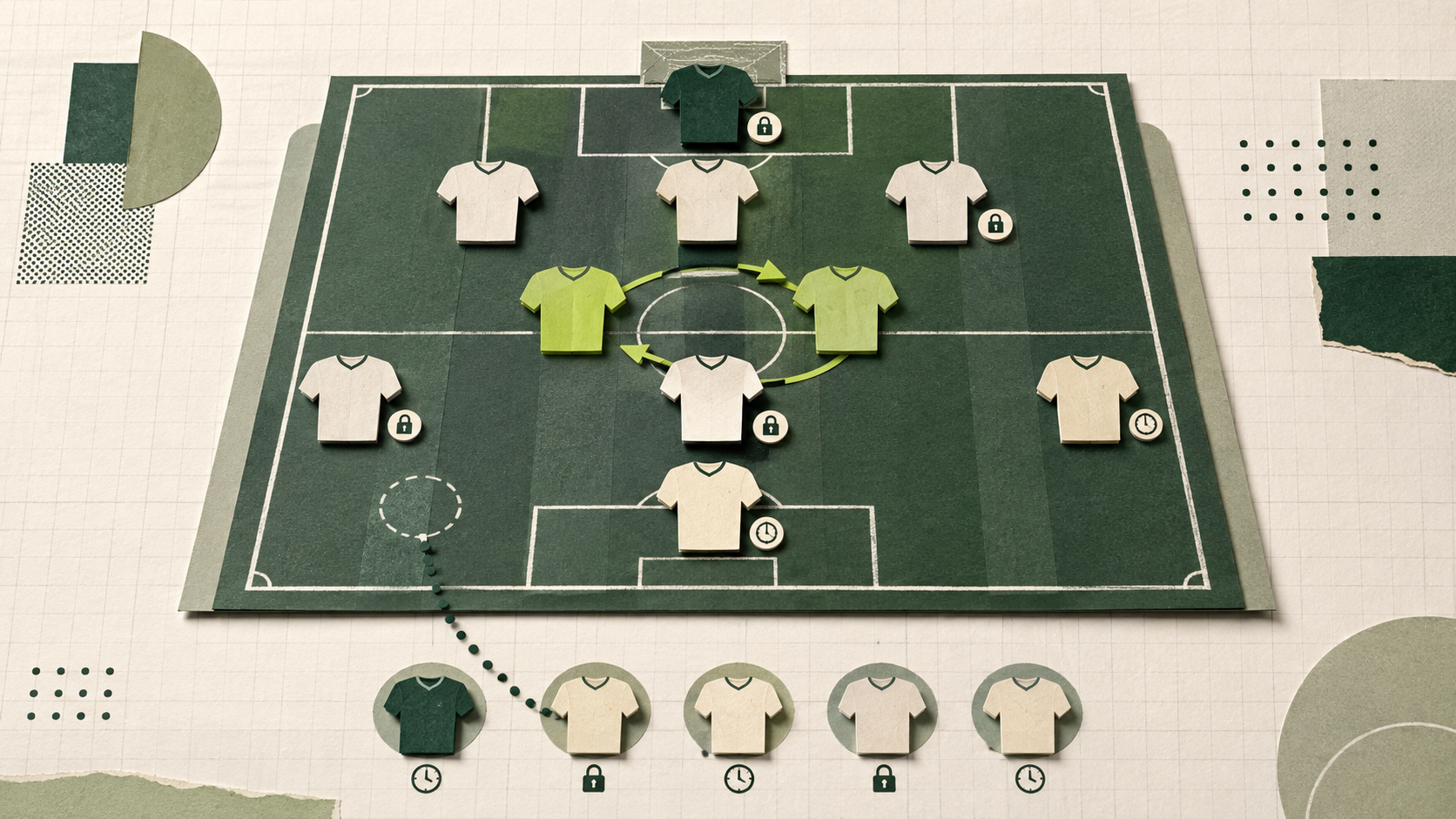
Setting a draft fantasy lineup is not simply a matter of starting your 11 biggest names. The best decision depends on who is likely to play, when each club kicks off, what your scoring model rewards and whether your bench can protect you if the team news goes against you.
TFF creates an initial legal lineup after the draft, but there is no button that chooses the best weekly XI for you. Each Gameweek, open My Team, make your changes and select Save lineup. Unsaved moves do not count, so the last valid saved lineup remains active until you successfully replace it.
Start with a legal XI
Your starting lineup is the one your commissioner set before the draft. The default is 1 goalkeeper, 3 defenders, 3 midfielders, 2 forwards and 2 FLEX players. FLEX accepts a defender, midfielder or forward, which lets you add strength wherever your squad has the best options. A goalkeeper cannot fill FLEX. A league can start 0, 1 or 2 goalkeepers. If it has no goalkeeper slot, the squad cannot carry a goalkeeper. Otherwise it can carry at most two.
A full roster leaves everyone else on the bench. The default roster is 16, so that is 5 bench spots, and the countable squad can later sit anywhere from 13 to 16. A smaller roster has a shorter bench. The floor is always the starters plus 2, and the ceiling is the roster size chosen at create. Think of the bench as the spots your league actually has. Every non-IR (non injury reserve) player must still be placed in the XI or on the bench before the lineup can be saved.
Minutes come before the fixture
The first question is not whether a player has an attractive opponent. It is whether they are likely to appear. A regular starter in a difficult match will often offer a better floor than a rotation risk in a favourable one. Recent starts, minutes, injuries and suspensions should shape the decision before you compare fixtures.
TFF player cards can show appearance-based profile labels such as Nailed On and Rotation Risk, while My Team highlights injuries, suspensions, blanks and double Gameweeks. These are decision aids rather than predictions. Use the research drawer and Stats Hub for context, then check trusted team news close to kickoff when a starting decision remains uncertain.
Let the scoring model break close calls
The lineup shape is the same in Classic, Balanced and Analytics, but the best player for the final slot may change. Classic keeps most of the emphasis on goals, assists, clean sheets and appearances. Balanced adds more value for attacking and defensive actions. Analytics places greater weight on creation and defensive work, with less dependence on finishing.
When two players have similar expected minutes, use the league's scoring model to separate them. A creative midfielder or active defender can be the better FLEX choice in Balanced or Analytics even when another player has the more obvious route to a goal. The TFF scoring guide explains how the same performance can produce different scores.
Use kickoff times to preserve flexibility
TFF does not lock the whole lineup at one Gameweek deadline. Each player locks when their club's first assigned fixture begins. Once locked, that player cannot move between the XI and bench, and an unlocked player cannot take their slot. A bench rank also locks with the player occupying it.
This makes slot placement part of the decision. Where possible, place an earlier-kickoff player in their fixed positional slot and keep a later-kickoff option in FLEX. If late news changes, the unlocked FLEX player may still be swapped with another eligible outfield option. Filling FLEX with the earliest kickoff can close that route before you need it.
Treat squad-role icons as information, not substitutions
Once a club publishes its lineup, TFF can label a player as Starting, Bench, Came on or Out of squad. Starting uses a person icon, Bench a muted seating icon, Came on green and red arrows, and Out of squad a red prohibited symbol. Injury and suspension icons are separate. No squad-role label before the club lineup is published does not mean the player is out.
These labels do not move anybody in your fantasy lineup. A locked fantasy starter shown as Bench stays in the XI while the Gameweek is Live. If they come on for even a few minutes, they have made an appearance, keep the fantasy starting slot and score whatever they earn. Only a player who finishes the entire TFF Gameweek with zero minutes can be replaced automatically.
Put your bench in the order you want it used
Bench Priority 1 is the first option considered, followed by Priority 2 and so on. Order the bench by who you would most want to enter the XI, but account for positional legality. A substitute goalkeeper can replace only the starting goalkeeper, while outfield replacements may use the FLEX route to preserve a legal XI.
Do not hide an uncertain player at Priority 1 merely because their ceiling is high. If they also record zero minutes, the system moves to the next eligible bench player. Review the order before the earliest bench fixture begins because that rank locks with its occupant at kickoff.
Automatic substitutions happen only at Final
While a Gameweek is Live, a locked starter who has not appeared remains in the XI at zero. A bench player may already have points showing, but those points do not enter the matchup total mid-week. This can make the Live score look harsher than the result that will eventually become Final.
After the last assigned fixture and the finalisation window, TFF checks every starter with zero minutes. It walks the bench from Priority 1 to 5 and uses the first player who appeared, has not already been used and keeps the XI legal. If there is no legal replacement, no substitution is made. Completed changes then appear in the matchup's Automatic substitutions section.
Auto-subs are on by default. The commissioner can turn them off before the draft freezes, or after a Gameweek is Final and before the next first kickoff. When they are off, Final scores the locked XI with no replacements. Finished matchups stay as scored.
Plan for blanks, doubles and postponements
A player with two fixtures in the same TFF Gameweek locks at the first kickoff and scores across both. Any appearance in either fixture prevents an automatic substitution. A player with no assigned fixture is treated as a blank, scores zero and can still move until the final kickoff of the Gameweek before lineup changes close.
Postponements and rearranged fixtures can move a match into another TFF Gameweek, creating a blank or double later. Check the fixture chips on My Team rather than relying on the original schedule. The same principle applies throughout: protect certain minutes first, then use fixtures and scoring to chase the higher ceiling.
A five-minute Gameweek routine
-
Open My Team and check the readiness warning.
-
Move injured, suspended or likely absentees out where possible.
-
Compare the close calls using expected minutes, fixture and scoring model.
-
Keep later-kickoff options flexible and review every bench priority.
-
Select Save lineup and confirm the changes have persisted.
Ready to manage your own XI each week? Start your first league and build a squad nobody else in your league can own.